Yesterday we got your agent up and running
complaints-complaints.csv and learned where the data came from.CLAUDE.md or AGENTS.md loaded automatically in every session.Agenda
You don't need magic phrasing. Just talk to it.
The agent reads right through misspellings, bad grammar, duplicates, rambling, contradicting yourself mid-prompt, even saying “never mind.”
Four prompts I reach for most
These are additions to "interview me and make a plan."
Use it before touching an unfamiliar method or any package whose syntax shifted in the last year. Training cutoffs make these the highest-hallucination zones.
Grounds the rest of the conversation in what's actually true, not the agent's best guess from training.
Use it after plan mode when you want to push the agent to name what it is still assuming.
Surfaces gaps before they become mistakes. Cheaper to clarify now than to roll back later.
Use it after the first messy attempt.
Same logic as rewriting a script after the first exploratory pass. The agent knows the data shape now; let it design the clean version.
Use it after the agent says a task is done.
Asks for files touched, commands run, and decisions made, not the cheerful recap. Catches silent edits to scripts you did not ask about.
Today's data: the Invisible Institute's Chicago police records
A Chicago non-profit newsroom publishes the largest open dataset of municipal police misconduct in the country: every complaint filed against a Chicago Police Department officer, with disciplinary outcomes attached, going back to 1988.
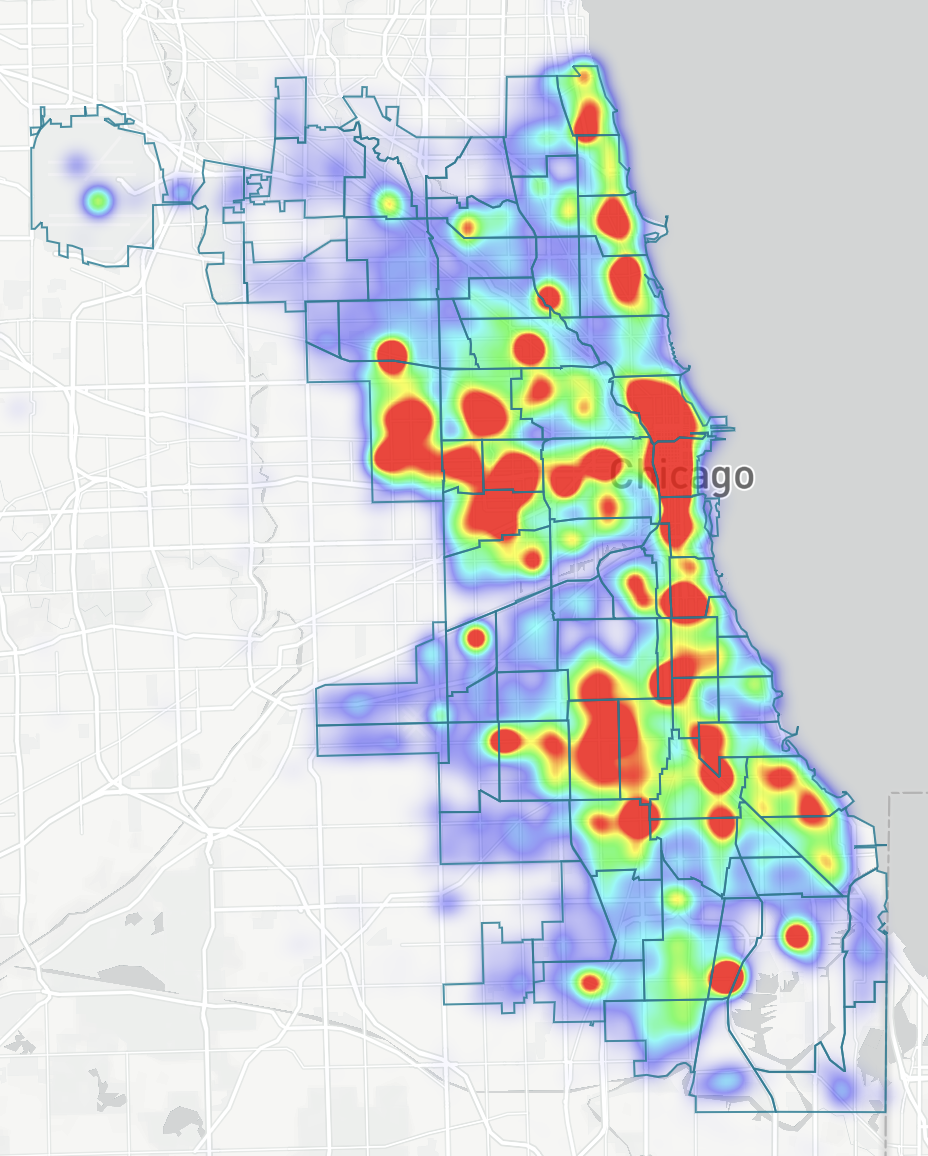
Complaint density across Chicago beats.
Source: invisible.institute/police-data · cpdp.co · github.com/invinst/chicago-police-data
Today's regression
How to start the conversation
The agent jumps in and picks variables, an estimator, an FE structure, a sample, and a clustering level. You spend the next ten prompts unwinding choices you never made.
The agent asks. You answer. The spec is more yours than the agent's.
The interview only narrows your choices to the ones the agent thought to ask. Notice what it didn't ask.
What the agent should know before running a regression
Four things to pin down before any code runs. Hand them to the agent however fits: say it each time, keep the stable ones in a memory file, or bake them into a skill (we cover skills later).
fixest, statsmodels, linearmodels, etc.Build the plan with the agent
Three steps, in order. Once you and the agent agree on the plan, you have something concrete to check execution against.
Tell the agent what you want. Let it ask. Answer. Don't let it skip ahead to code.
Numbered steps, one screenful. What it loads, what it computes, what it saves. Concrete enough to disagree with.
Read every step. Push back. Fix it. Once you approve, the agent works inside the plan.
Join the data and run the first regression
Debrief & Questions
- What worked?
- Where did you get stuck?
- What surprised you?
Global rules apply to every Claude Code session. Local rules only apply to the project.
When you open the agent inside a project, it reads both files: the global one, then the local one.
The relationship between global and local memory files
- Cluster SE at the unit of treatment assignment
- For staggered DiD: do not use TWFE, instead use CSDID
- Round coefficients to 3 decimals
- *p<.05, **p<.01, ***p<.001
- cr_id is the join key
- cluster at beat
- sustained is 0/1
- codebook at
data/codebook.md
- person-year is the unit
- cluster at firm-year
- balance the panel before estimating
- Round coefficients to 4 decimals
- dedup self-citations
- cluster at assignee
- restrict to utility patents
- *p<.10, **p<.05, ***p<.01
When rules conflict, the closer rule wins
The agent reads global first, then project, then your chat. Each lower layer overrides the layers above.
Memory is rented attention, not free storage
Every line in your memory file loads into the agent's context on every session. The longer the file, the less room the agent has to do the work you asked for.
Rule of thumb: keep each file under about 200 lines, and shorter is better. If it grows past that, move the long parts into a linked file or a skill.
A lean project memory file, annotated
Have the agent interview you to create your project memory file
Debrief & Questions
- What worked?
- Where did you get stuck?
- What surprised you?
A skill is a recipe for a task you do over and over.
CLAUDE.md applies to every session inside one project.A
SKILL.md applies to one specific task type across all projects.- Format a regression table
- Format a figure
- Write prose in your voice
- R or Python syntax preferences
A SKILL.md lives in a folder. It can reference helper files.
A skill is a recipe you reuse across projects.
How skills affect your context window
Skills load in three tiers. Only the name and description automatically load into the context window.
name and description. A line or two. The agent reads this every session to decide whether to reach for the skill.SKILL.md: the recipe steps, conventions, package calls.Each skill costs roughly 75 to 150 tokens at Tier 1. Fifty short descriptions is about 5K tokens, small relative to a 1M context window.
Where skills live on your computer
~/.claude/skills/ (Claude Code) or ~/.agents/skills/ (Codex CLI). Loads in every project.format-regression-table, format-figure<project>/.claude/skills/ or <project>/.agents/skills/. Loads only in this folder.cpd-coding-conventionsYou don't have to write all your skills from scratch
Other people have already written skills for many common tasks. Browse and install instead of building.
~/.claude/skills/ or ~/.agents/skills/.Author a table-formatting skill
Debrief & Questions
- What worked?
- Where did you get stuck?
- What surprised you?
Patterns that make a SKILL.md more reliable
A skill body can be more than freeform prose. Three patterns from well-authored skills keep the agent on the rails.
Tell the agent it MUST do X before continuing. Useful for prerequisites the agent likes to skip.
A table of thoughts that signal the agent is rationalizing, paired with the reality. Catches common drift.
A Graphviz/DOT diagram embedded in the skill. The agent reads the graph and follows the path step by step.
Browse the Superpowers and Anthropic skills repos to see these patterns in real skills (Day 3 install).
Figure-skill standing defaults
A figure skill answers the question: what about a figure should be the same every time, and what changes plot to plot?
- Which variables go on which axis
- Faceting or grouping for this comparison
- Geom choice (points, lines, bars, ranges)
- Palette for this specific comparison
- Save both
.pdfand.pngtoresults/figures/ - Custom ggplot2 / matplotlib theme
- Axis labels in words, not variable names
- Source line baked into the figure (the caption stays in the manuscript)
The figure skill knows your style. You only have to say what's different about this plot.
When a plot still looks wrong, paste a screenshot of it and ask the agent to fix the theme. It sees what you see.
Author a figure-formatting skill
Debrief & Questions
- What worked?
- Where did you get stuck?
- What surprised you?
Drafting prose with the agent
- Ask for 500 words on the topic
- Accept what comes back
- Edit at the sentence level
- Get hedged prose and invented citations you then have to fact-check
- Bring your notes, the table, the figure, and your argument
- Spec the structure: section headers, what each paragraph claims
- Ask for paragraphs that fill in around your structure
- Edit at the paragraph and argument level
Write and compile your draft
Debrief & Questions
- What worked?
- Where did you get stuck?
- What surprised you?
What's on your machine now
format-regression-table. The next table starts from your format.format-figure. The next plot starts in your theme..docx with the table and figure embedded.